
yamlify-object
Stringify object/array with yaml syntax



Last updated 5 years ago
by eugeny-dementev
.
MIT
·
Repository
·
Bugs
·
Original npm
·
Tarball
·
package.json
$ cnpm install yamlify-object
SYNC missed versions from
official npm registry.
yamlify-object


Stringify object/array with yaml syntax
Install
npm install yamlify-object
Usage
const yamlifyObject = require('yamlify-object');

const obj = {
  array: [
    2,
    'two',
    {
      emptyArray: [],
    },
  ],
  error: new Error('message'),
  date: new Date(0),
  object: {
    number: 200,
    bool: false,
    null: null,
    undefined: undefined,
    emptyObject: {},
  },
};

obj.circular = obj;

const formattedString = yamlifyObject(obj, {
  indent: '  ',
  prefix: '\n',
  postfix: '\n',
});

console.log(formattedString);
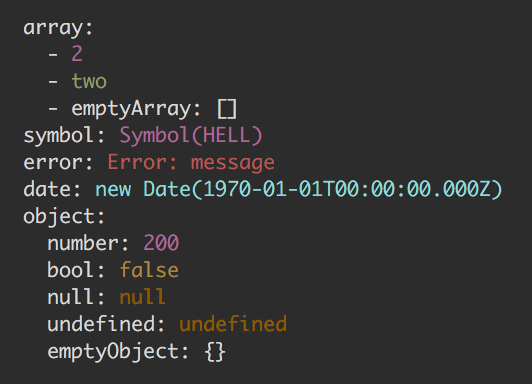
/*

  array:
    - 2
    - two
    - emptyArray: []
  error: Error: message
  date: new Date(1970-01-01T00:00:00.000Z)
  object:
    number: 200
    bool: false
    null: null
    undefined: undefined
    emptyObject: {}
  circular: [Circular]

*/
API
yamlifyObject(input, [options])
input
Type: Object Array
options
indent
Type: string
Default: ' ' - single space
prefix
Type: string
Default: '\n'
postfix
Type: string
Default: ''
dateToString(date: Date)
Type: Function
Expected to return a string that stringified version of Date instance.
errorToString(error: Error)
Type: Function
Expected to return a string that stringified version of Error instance.
colors
Type: object
Default:
{
  date: function (s: string): string,
  error: function (s: string): string,
  symbol: function (s: string): string,
  string: function (s: string): string,
  number: function (s: string): string,
  boolean: function (s: string): string,
  null: function (s: string): string,
  undefined: function (s: string): string,
}
Each property of colors object expected to be a function that
expected to return somehow colorified version of passed string argument.
You can specify colors only for types you need and the rest will stay colorless strings:
const obj = {
  number: 1
  string: 'str',
  bool: true,
};

const formattedString = yamlifyObject(obj, {
  colors: {
    number: (value) => `COLOR_CODE${value}COLOR_CODE`,
    boolean: (value) => `COLOR_CODE${value}COLOR_CODE`,
  },
});

console.log(formattedString);
/*
 number: COLOR_CODE1COLOR_CODE
 string: str
 bool: COLOR_CODEtrueCOLOR_CODE
*/
For terminal can be used yamlify-object-colors preset:
Current Tags
- 0.6.0 ... latest (5 years ago)
17 Versions
- 0.6.0 ... 5 years ago
- 0.5.1 ... 8 years ago
- 0.5.0 ... 8 years ago
- 0.4.5 ... 9 years ago
- 0.4.4 ... 9 years ago
- 0.4.3 ... 9 years ago
- 0.4.2 ... 9 years ago
- 0.4.1 ... 9 years ago
- 0.4.0 ... 9 years ago
- 0.3.0 ... 9 years ago
- 0.2.3 ... 9 years ago
- 0.2.2 ... 9 years ago
- 0.2.1 ... 9 years ago
- 0.2.0 ... 9 years ago
- 0.1.0 ... 9 years ago
- 0.0.2 ... 9 years ago
- 0.0.1 ... 9 years ago
Maintainers (1)
 eugeny-dementev
Downloads
Today
0
This Week
0
This Month
0
Last Day
0
Last Week
2
Last Month
2
Dependencies (0)
None
Dev Dependencies (9)
- babel-cli ^6.24.1
- babel-lab ^2.0.0
- babel-plugin-array-includes ^2.0.3
- babel-preset-env ^1.5.1
- codecov.io ^0.1.6
- eslint ^3.19.0
- eslint-config-airbnb-base ^11.1.3
- eslint-plugin-import ^2.2.0
- lab ^13.0.2
Dependents (1)